
Learn everything about Core Web Vitals, including LCP, INP, CLS, and how to improve website performance, user experience, and Google rankings in 2026.
What are Core Web Vitals?
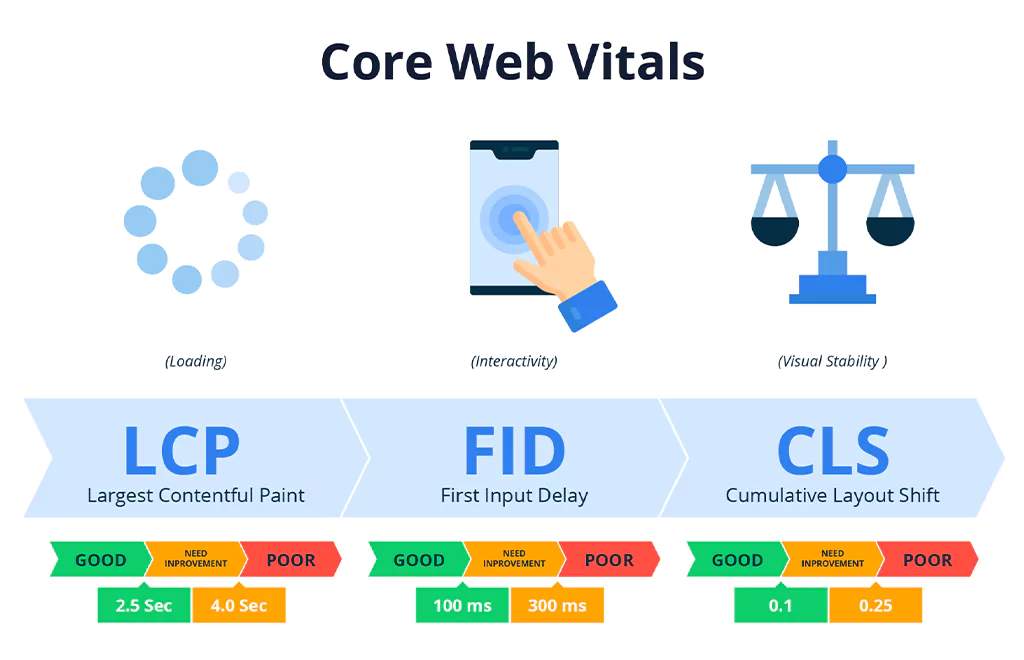
Core Web Vitals are a set of user experience metrics developed by Google to evaluate website performance. These metrics focus on how quickly users can interact with a webpage and how stable the content appears during loading.
Google currently focuses on three main Core Web Vitals metrics:
- Largest Contentful Paint (LCP)
- Interaction to Next Paint (INP)
- Cumulative Layout Shift (CLS)
These metrics help determine whether a website provides a good user experience.
Largest Contentful Paint (LCP)
Largest Contentful Paint measures how quickly the main content of a webpage loads. It focuses on the largest visible element, such as an image, heading, or banner.
LCP < 2.5\text{ seconds}
A good LCP score should be less than 2.5 seconds. If your page takes too long to load, users may leave the website before interacting with it.
Common Causes of Poor LCP
- Slow server response time
- Large image sizes
- Unoptimized CSS and JavaScript
- Poor hosting performance
- Render-blocking resources
How to Improve LCP
- Compress and optimize images
- Use WebP image format
- Upgrade to faster hosting
- Enable browser caching
- Use Content Delivery Networks (CDN)
- Minify CSS and JavaScript files
- Remove unnecessary plugins
Improving LCP helps increase user satisfaction and reduces bounce rates.
Interaction to Next Paint (INP)
Interaction to Next Paint measures how responsive a website is when users interact with it. This includes clicking buttons, typing in forms, or opening menus.
INP < 200\text{ ms}
A good INP score should be below 200 milliseconds. Faster interaction improves user experience and website usability.
Causes of Poor INP
- Heavy JavaScript execution
- Slow browser rendering
- Large third-party scripts
- Poor frontend optimization
How to Improve INP
- Reduce JavaScript execution time
- Remove unused code
- Optimize third-party scripts
- Use lightweight themes
- Enable lazy loading
- Split large JavaScript files
Improving responsiveness helps users interact with your website smoothly.
Cumulative Layout Shift (CLS)
Cumulative Layout Shift measures visual stability. It tracks how much webpage elements move unexpectedly while loading.
CLS < 0.1
A good CLS score should be below 0.1. Unexpected layout shifts create poor user experience and frustrate visitors.
Common Causes of High CLS
- Images without dimensions
- Ads loading dynamically
- Fonts causing layout changes
- Slow-loading elements
- Popups and banners
How to Improve CLS
- Set width and height for images
- Reserve space for ads
- Use proper font loading
- Avoid inserting content above existing content
- Optimize dynamic elements
Stable layouts improve usability and user trust.
Why Core Web Vitals are Important for SEO
Core Web Vitals directly affect user experience and Google rankings. Websites with better performance metrics usually rank higher because they provide better browsing experiences.
Benefits of Optimizing Core Web Vitals
- Faster website loading
- Better mobile performance
- Higher Google rankings
- Improved user engagement
- Lower bounce rates
- Better conversion rates
- Increased organic traffic
Google prioritizes websites that deliver excellent page experience.
Best Tools to Measure Core Web Vitals
Several tools help analyze and improve Core Web Vitals performance.
Core Web Vitals – Google PageSpeed Insights
This tool provides performance scores and improvement suggestions for desktop and mobile devices.
Google Search Console
The Core Web Vitals report in Search Console identifies pages with poor performance.
Lighthouse
Lighthouse helps analyze speed, accessibility, and SEO issues.
Chrome DevTools
Developers can debug and optimize website performance using Chrome DevTools.
How to Improve Core Web Vitals
Improving Core Web Vitals requires both frontend and backend optimization.
Optimize Images
Large images slow down websites significantly. Use compressed formats like WebP and lazy loading to improve performance.
Minify CSS and JavaScript
Reduce file sizes by removing unnecessary code, spaces, and comments.
Use Fast Hosting
Choose reliable hosting providers with strong server performance and SSD storage.
Enable Browser Caching
Caching helps browsers load pages faster for returning visitors.
Use CDN Services
Content Delivery Networks distribute content globally and reduce loading times.
Reduce Third-Party Scripts
Limit unnecessary plugins, ads, trackers, and external scripts.
Optimize Mobile Experience
Most users browse websites on mobile devices, so mobile optimization is essential.
Core Web Vitals and Mobile SEO
Google uses mobile-first indexing, meaning mobile performance heavily impacts rankings. Websites must load quickly and function smoothly on smartphones and tablets.
Mobile Optimization Tips
- Use responsive design
- Optimize font sizes
- Improve touch navigation
- Reduce popup interruptions
- Compress mobile images
Mobile-friendly websites achieve better SEO performance.
Common Mistakes
Many websites struggle with performance due to avoidable mistakes.
Common Issues
- Unoptimized images
- Slow hosting servers
- Too many plugins
- Heavy themes
- Render-blocking JavaScript
- Large CSS files
- Excessive ads
- Missing image dimensions
Avoiding these issues improves website speed and stability.
Conclusion
Core Web Vitals are essential for improving website performance, user experience, and search engine rankings. Optimizing metrics like LCP, INP, and CLS helps websites load faster, respond smoothly, and remain visually stable.
Businesses, bloggers, and website owners should regularly monitor their Core Web Vitals scores and implement performance improvements to stay competitive in search rankings.
A fast and user-friendly website not only improves SEO but also increases engagement, conversions, and customer satisfaction.
FAQ’s
1. What are Core Web Vitals?
Core Web Vitals are Google metrics that measure website loading speed, responsiveness, and visual stability.
2. Why are Core Web Vitals important for SEO?
Core Web Vitals improve user experience and are considered ranking factors in Google Search.
3. What is a good LCP score?
A good Largest Contentful Paint score is less than 2.5 seconds.
4.What is a good INP score?
A good Interaction to Next Paint score is below 200 milliseconds.
5. What is a good CLS score?
A good Cumulative Layout Shift score should be below 0.1.
6. Which tool is best for checking Core Web Vitals?
Google PageSpeed Insights and Google Search Console are commonly used tools.
7. How can I improve Core Web Vitals?
Optimize images, reduce JavaScript, improve hosting, enable caching, and use a CDN.
8. Do Core Web Vitals affect mobile SEO?
Yes, Google uses mobile-first indexing, so mobile performance strongly affects rankings.
9. Is Core Web Vitals important for WordPress websites?
Yes, WordPress websites should optimize speed, themes, plugins, and images for better Core Web Vitals scores.